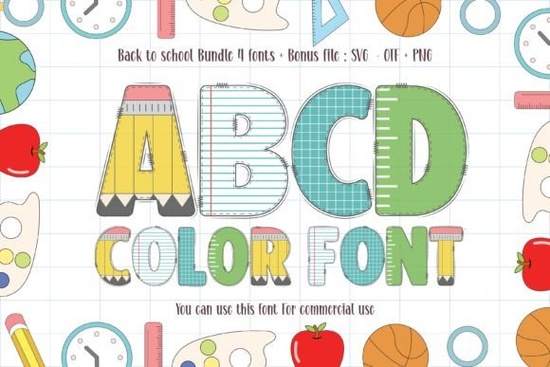
When you're creating designs for school‑related projects think classroom posters, lunchbox labels, or festive back‑to‑school announcements a standard black font often feels a little flat. That's where the Back to School Font steps in. This thick‑lettered, incredibly unique color font brings instant personality to any kid‑friendly project. Its built‑in colors mean you don't have to spend extra time layering or picking palettes just type and your words already pop with a playful, hand‑drawn feel.
What makes a color font different from a standard font?
Most fonts you use are black outlines that you color in yourself. Color fonts like the Back to School Font contain multiple colors inside each letter. They use a technology called OpenType‑SVG, which allows different regions of a glyph to have different fill colors, gradients, or even textures. That means when you type out a word, the letters come out already colored, often with a hand‑lettered or crayon‑like effect. For projects targeting children, that built‑in color saves time and makes your design feel more finished right away.
How can you use this Back to School font in your projects?
The possibilities are wide, especially for designers and crafters working in the school or children's niche. Here are a few practical ideas:
- Back‑to‑school flyers and banners – The thick, chunky letters stand out even on busy backgrounds. Use it for event announcements, open house invitations, or classroom door signs.
- Personalized stationery and labels – Print names on pencils, folders, or water bottles. The color font adds a custom, whimsical touch that kids love.
- Social media graphics for teachers or small businesses – Create engaging posts for classroom updates or school supply sales. The font's readability works well even on mobile screens.
- Print‑on‑demand products – From t‑shirts and tote bags to growth chart posters, the bold, colorful letters make products instantly appealing to parents and children.
- Digital scrapbooking and invitations – Use it for kids' birthday party invites, especially those with a school or learning theme. The font fits perfectly with chalkboard‑style or painted backgrounds.
Is this font easy to work with in design software?
Yes, but with a small catch. The Back to School Font is a color font, so you'll need software that supports OpenType‑SVG features. Adobe Photoshop, Illustrator, and InDesign (from their 2018 versions and later) handle it well. So do recent versions of Affinity Designer and CorelDRAW. If you're using a simpler program like Canva, check whether it supports color fonts some updates now do. On a Mac, even Pages and Keynote can display the font correctly. For best results, avoid older software that may only show a black outline version of the font.
When you install the font on your computer, it will appear in your font menu under the same name. Just type your text, choose the font, and the colors automatically render. No extra steps needed.
Where to find more colorful fonts for children's projects?
The Back to School Font is a standout, but you might also want complementary fonts for headers or decorative touches. Other playful options include KG Primary Penmanship for a classic handwriting look, or Chalkboard Letters for a dusty classroom vibe. If you prefer all‑caps display fonts, Little Learners offers a rounded, friendly feel. Each of these can be paired with the Back to School Font to create layered typography that's both playful and readable.
For even more inspiration, you can browse the Back to School collection on Creative Fabrica it groups similar color fonts and school‑themed designs together, making it easy to find a full set for your project.
Practical checklist for using this font
Before you jump into designing, here's a quick step‑by‑step to make sure everything runs smoothly:
- Download and install the font – After purchase, download the file (usually a .otf or .ttf) and install it on your computer (double‑click and hit “Install” on Windows, or use Font Book on Mac).
- Check software compatibility – Open your design program and verify that it supports color fonts. If not, consider using a free trial of Adobe Illustrator or Affinity Designer.
- Test the font in a simple document – Type a few words and see how the colors render. Adjust size and spacing the thick letters work best at medium to large sizes (at least 24pt).
- Pair with a simple background – Because the font is already colorful, keep backgrounds neutral (white, off‑white, or a muted pastel) to avoid visual clutter.
- Export with color font support – When saving your final file, use PNG or PDF to preserve the multi‑color effect. Avoid exporting as a standard black‑and‑white SVG unless your software handles color fonts natively.
Once you've mastered those steps, you'll have a fast, fun way to add instant color and charm to any back‑to‑school design. The Back to School Font is more than a one‑time asset it's a time‑saving tool you can reuse across flyers, merchandise, and digital content all year long. Next time you need a thick, playful letter style that feels like it was drawn with crayons, this font will be your go‑to.
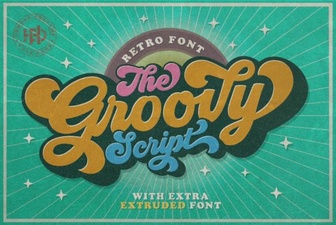 Groovy Fonts: Creative Design Projects for Your Website
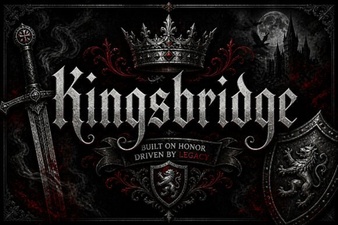 Craft with Kingsbridge Font for Your Designs
 The Pokenom Font: a Creative Toolkit for Designers
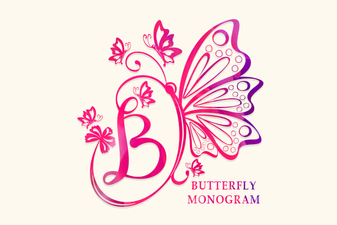 Butterfly Monogram Font: Design Your Elegant Initials
 Free Download of the Biscuit Font Design Package
 Design with Playful Lucky Chunks Typography